
Data centre hosting for small businesses
Your PCs, servers, storage and backups in our own space in a secure UK data centre, looked after by us and reached securely from wherever your people work.
Your equipment, somewhere better than the office
Many small businesses keep an office mainly because the computers are in it. The server lives in a cupboard, on one internet line and one power supply, behind an ordinary door lock.
We have our own rack space in a UK data centre, where we host our clients’ equipment, and there is room for more. We move your equipment into it, set up secure remote access and look after it from then on. Your people work from home, from site or from a smaller office, on the same machines and the same files.
We have already done this for one of our clients. Read how we moved a structural engineering practice into the data centre over a weekend.
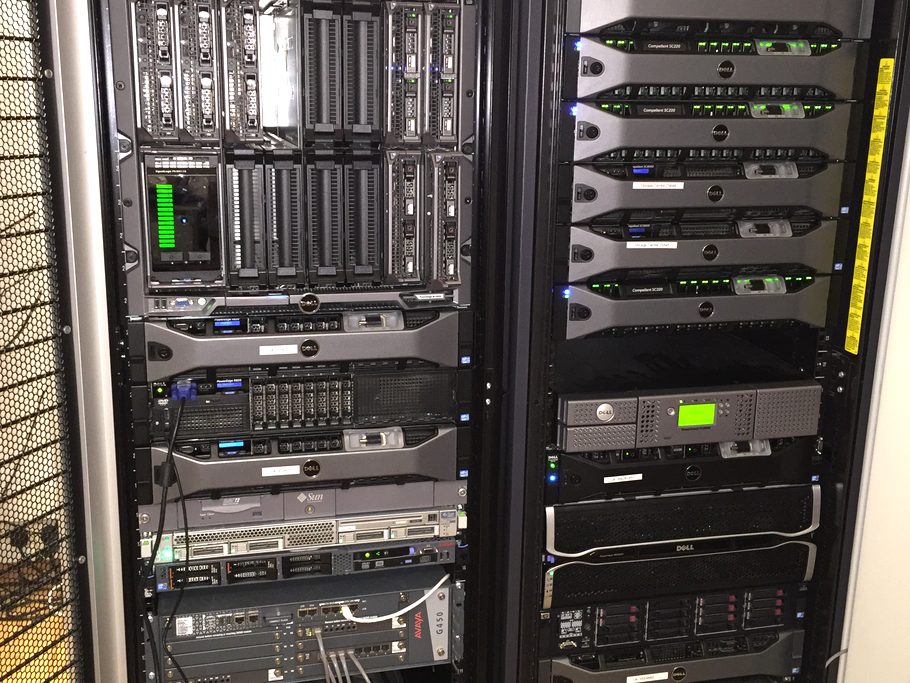
What we can host
PCs and workstations
High-specification PCs for drawings, modelling or editing, each reached securely by the person who uses it, from wherever they are working.
Servers
The server your business still depends on, moved out of the office cupboard and into a room built for it.
Storage
Storage arrays and network storage holding your shared files, kept next to the machines that use them.
Firewall and network
Your own firewall and switches alongside it, so your equipment sits on its own protected network.
A second copy of your backups
A backup kept away from your office, in a secure building, in case of fire, flood or theft.
Looked after for you
We monitor everything we host around the clock and go to the data centre ourselves when hands are needed.
Why a data centre
What your equipment gets that an office cannot give it.
Power that stays on
More than one power feed, backed by batteries and generators.
Fast, resilient internet
A much faster connection than an office line, with more than one route out.
Physical security
Access to the building and to the racks is controlled and recorded.
Built for computers
A cooled, monitored room in place of a cupboard next to the kitchen.
Two ways to move
We agree the route with you at the start. Both are planned so that your people lose as little working time as possible.
Parallel build
The network and storage are set up and tested in the data centre while your office carries on as normal, and your data is copied across in advance. Only the last pieces of equipment move at the end.
- Least time without your systems
- The office stays in place as a way back
- Suits businesses that cannot afford to be offline
Lift and shift
Everything is shut down, carried to the data centre, reconnected and tested over a weekend. Your people finish on Friday and start again on Monday.
- Simpler and quicker to arrange
- Lower cost, as nothing is duplicated
- Suits smaller setups that can be offline for a weekend
How it works
- Step 1
Review
We look at what you have, how your people work and what would be worth moving.
- Step 2
Design
We plan the space, the network and the secure remote access, and give you a fixed monthly price.
- Step 3
Move
We carry out the move by whichever of the two routes suits your business.
- Step 4
Manage
From then on we monitor the equipment and look after it for you.
Common questions
What is data centre hosting?
Your computers, servers or storage are kept in racks in a data centre and not in your office. A data centre is a secure building designed for computer equipment, with resilient power, cooling and internet connections. This is also called colocation.
How is it different from the cloud?
In the cloud you rent someone else’s computers. With hosting, the equipment is yours, set up the way your business needs it, and you can see exactly where your data is. Many businesses use both: Microsoft 365 for email and documents, and hosted equipment for specialist software and very large files.
Can our staff use their own powerful PCs remotely?
Yes. Each person connects securely to their own PC in the data centre and works on it as if they were sitting in front of it. It suits engineers, architects, surveyors and anyone else whose software needs a powerful machine.
Do we need to buy new equipment?
Not necessarily. We can move equipment you already own if it is suitable, and advise on anything that should be replaced first.
Where is the data centre?
In the UK. For security we do not publish the location, and we give the details to clients when we discuss their needs.
What does it cost?
A fixed monthly fee that depends on how much space and power your equipment needs and on what you want us to manage. We quote after a free IT review.
How long would we be without our systems?
It depends on the route. With a parallel build, only the last equipment has to move, so the gap is short. With a lift and shift, everything is moved over a weekend. Either way we plan it so that the working week is not affected.
Could your equipment live in a data centre?
Start with a free review of your IT: about an hour, no obligation, and a short written summary of what we find.